Programming in C#, Java, and god knows what not

ConnectionString Loses Password Field

Illustration

One application used ConnectionString that read “Server=.\SQLEXPRESS; Database=MyDatabase; MultipleActiveResultSets=true; User ID=MyUser; Password=MyPassword; Connect Timeout=10;”. Yes, I know all dangers of transporting user id and password in this manner, but trust me, there was no other choice for this particular scenario. It worked for quite some time and I was satisfied with it.

As upgrade went, I needed one additional connection. I saw no problem with it, I did it plenty of times:

public SqlConnection Clone(SqlConnection original) {
    var clone = new SqlConnection()
    clone.ConnectionString = original.ConnectionString
    return clone;
}

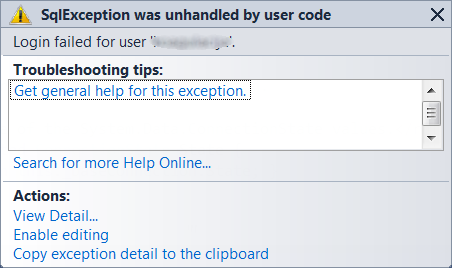
However, in this particular scenario, all I got was “Login failed for user…” message. After some checking, I noticed one peculiar thing. My connection string, as far as SqlClient was concerned, was “Server=.\SQLEXPRESS; Database=MyDatabase; MultipleActiveResultSets=true; User ID=MyUser; Connect Timeout=10;”. My Password field was completely missing!

ConnectionString gets cleaning treatment and password just gets omitted. Solution comes in form of one additional parameter. If we add “Persist Security Info=true;” to out ConnectionString SqlConnection will give us enough rope to hang ourself and Password field will be preserved.

Visual Studio 2010 SP1 Beta

Illustration

Visual Studio 2010 has SP1 lurking around. It just arrived in form of beta accessible only to MSDN subscribers but I am sure that general public will get it at Thursday.

Total download size is 593 MB in single ISO. Exact content of package was not published (as time of writing this post) so I risked my main development machine and I installed this service pack beta based on faith alone. Installation took around an hour with need for single restart and with annoying flashing of taskbar button every few minutes (probably as each independent package was queuing-up).

I must confess that I see no big difference. Everything is where it should be. There might be some new templates and there is probably a lot of bug-fixing around. However, everything appears to be stable and this is best thing I can say about any beta.

As expected, it also contains new offline Help Viewer. Cries for normal offline viewer started with Visual Studio 2010 beta and only grew stronger with final release. This service pack finally brought something that works as good as offline viewer in times of Visual Studio 6.

I am eagerly waiting to see which features I missed and what exactly is in this service pack. In meantime I hope that my machine will not crash… :)

[2010-12-08: Official announcement is available now.]

Fixed Width Columns in ListView

I like .NET’s ListView control and I often end up using it in places where even ListBox would suffice. ListView with single column in Details view is exactly look that I usually shoot for.

Of course, width of column needs to be adjusted in order to maximize usable space. This is easily done by simply resizing column to fit width of ListView but with some space reserved for vertical scrollbar. Here is code for e.g. Form_Load:

listView_columnTest.Width = listView.ClientRectangle.Width - SystemInformation.VerticalScrollBarWidth;

And, if there weren’t any users, that would be enough. Problem is that any user can change with of column and thus disturb our delicate balance :). Solution is in handling ListView.ColumnWidthChanging event. Somebody would expect that setting e.Cancel to true would be enough but this is actually not a case. Full solution requires two lines:

private void lsvFilters_ColumnWidthChanging(object sender, ColumnWidthChangingEventArgs e) {
    e.NewWidth = ((ListView)sender).Columns[e.ColumnIndex].Width;
    e.Cancel = true;
}

Benchmarking SQL

When I work on improving database performance, I follow three simple steps: measure, measure and measure. Basic tool for that is simple timer. In SQL Server syntax that would read something like this:

CHECKPOINT; DBCC DROPCLEANBUFFERS;
DECLARE @StartTime DATETIME = GETDATE();

SELECT SomeField1, SomeField2 FROM SomeTable WHERE (SomeFieldN='Something');

SELECT [Duration] =  DATEDIFF(ms, @StartTime, GETDATE());

Although code is pretty much straightforward, first line requires some explanation.

SQL Server is pretty smart tool with lot of caching going around and testing on cached data is not something that gives consistent results. CHECKPOINT statement ensures that all dirty pages are written to disk and DBCC DROPCLEANBUFFERS ensures that cache is cleaned. Those two statements together basically force database to be in worst-case-scenario for performance but in best state for testing.

Of course, not all decisions can be made by this simplest of all tests. However, it will serve as pretty good rule of a thumb.

Should I REORGANIZE or REBUILD?

As I work on adding new stuff to existing database there is good chance that indexes will get fragmented. On quite a few occasions I got them in 90% fragmentation range. And that affects performance.

SQL Server 2008 has two main ways to fight fragmentation. One is REORGANIZE command (e.g. “ALTER INDEX ALL ON MyTable REORGANIZE”). This will do simple shuffling of existing data. No new allocations will be done. Unfortunately this also means that, especially in case of multiple files, some things will stay unoptimized.

For worst-case-scenarios there is REBUILD (e.g. ALTER INDEX ALL ON MyTable REBUILD). This command creates new index instead of current one. This will probably cause some new allocations and thus it will take a little longer, but final result will be impeccable.

Microsoft has really nice page that explains both how to check fragmentation and what can be done to solve it. Rule of thumb there is that you should REBUILD once fragmentation is over 30% and REORGANIZE when fragmentation is lower. I view this as quite good rule if you have SQL Server Enterprise. However, if Enterprise is not your edition of choice, things change a little.

Since I mostly work with SQL Server Express, only question that I ask my self is whether database can be offline. Below Enterprise edition, REBUILD operation CAN NOT be done while other operations are pending. If database has to be accessible, only option is REORGANIZE.

I do not mind that much since REORGANIZE is usually sufficient. And, if changes are large enough that they would cause real fragmentation mess, they are also big enough to allow for offline REBUILD.

I find that Microsoft has right to limit some functionality (in this case online rebuilds) to certain editions of their software. However, I do hate when they don’t find it necessary to document this “small” difference. On other had, if Microsoft did all documenting, I would have nothing to write about.

P.S. This represents my view as a programmer, database administrator might not approve this. :)

Version Control

Over time I played with quite a few Version control systems. Here I will explain why I hate each one. :)

WinRAR

My first source control consisted of nothing more than compressing project’s files in different archives. It became one source control system by which I will judge every other. It was probably best $35 that I ever spent on any software.

Microsoft SourceSafe

First one that I ever saw was Source Safe. I kind of liked it but this was time of simpler (Visual Basic 6.0) projects. I never used it at home since it was simply too expensive for me.

IBM ClearCase

First real contact with version control was in form of ClearCase. To put it in context, it felt like I was little kid getting introduced to gravity via drop from 1000 meters (more than 3200 feet for those SI-challenged).

We had one guy in company who’s sole responsibility was handling views and other black magic. After some time I did became a sort of expert for client side installations and I sorted more problems with it than I care to remember. I figured that version control needs to be complicated on both client and server level.

Not to be misunderstood, in those rare occasions when moon and sun were in just right position and as long as you sticked to Unix command line instead of Windows client, it did work as expected.

SourceGear Vault

As I was playing with ClearCase at work, I started to desire something for my personal projects also. Answer was in SourceGear’s Vault. It was in-place replacement for SourceSafe and it was free for single developer.

Trouble with it was that I just got too used to ClearCase and it’s control of everything in directory. With Vault I had only source under control. Documents, installations and other files that my projects contained were still under mercy of WinRAR.

Microsoft Team Foundation Server 2005

After I parted my ways with Vault, I missed source control. I missed it enough to install Team Foundation Server. Installation was made in hell. It had bunch of requirements and each requirement had it’s own requirement. It was mission impossible. I did install it at least but I decided that cost and pains that it puts me through are just not worth it. I never actually used it’s source control. And I never will.

SVN

Since ClearCase was getting too expensive and too painful to maintain, my team switched to SVN. It took some time to get used to work without checkouts but we mostly managed it. Since we had something like 20 people working for first time with same repository, we probably did every single thing you should not do.

Experience with it was actually good most of times. Although, I would like to kill idiot who decided that “.svn” folder in EVERY directory is appropriate way of storing information…

Microsoft Team Foundation Server 2010

I simply could not believe that same team did both 2005 and 2010 edition. Those two products could not be more different. Installation of Team Foundation Server 2010 went without issues. If I forget whole issue with Visual Studio 2008, whole product just worked.

Files outside solution were issue - it was annoyingly hard to track any file that appeared outside of project. As I started to work with stuff that isn’t in Visual Studio 2010, two of us just got parted. I still miss integrated work item handling.

If I ever went back to Microsoft-only world, I would use this.

Mercurial

I have no idea how I came to try Mercurial but I am glad I did. It uses file based management (like SVN) but “.hg” folder is only place where it stores everything of it’s own. Installation is dead simple, usage even better (TortoiseHg). It has plenty of rough edges but it feels good so far.

I love the most simplicity of administration and low system requirements. My home server has total of 256 MB and Mercurial can work on it.

I used it only for couple of months now (and that is actually less than any other system excluding TFS 2005) but I feel like it was made for me. It is my current choice. Will it remain, only time will tell.

And it is only source control system where backup can be done as easy as with WinRAR. Actually, I do it with WinRAR… :)

P.S. This text represents nothing else than my personal and highly subjective views. As it comes, I do care a lot about them and I consider everything written here to be absolutely correct. :)

P.P.S. Yes, I know that WinRAR was not intended to be version control system.
Merging SQL Server Tables

In one of my existing databases I had to switch from integer key to GUID. Annoying aspect of it is handling referential integrity issues and, as soon as there are two tables, you can bet that there will be issues.

Process was half manual and simple one: just create new field (e.g. Guid) and give it default of NEWID. Database itself will do the rest for that field’s value.

In order to sort out references, you can go in similar fashion. For every foreign key field just create one with GUID (E.g. ItemId gets it’s friend ItemGuid). After that just synchronize fields with simple SQL:

UPDATE Codes
SET ItemGuid = (
    SELECT Guid
    FROM Items
    WHERE Items.Id = Codes.ItemId
)

In this case, we had referential link between Codes.ItemId and Items.Id. Our goal was to switch that to Codes.ItemGuid and Items.Guid. Where statement ensured just that.

Async and Await

On Microsoft’s PDC Anders Hejlsberg gave a talk about two new keywords in C# - async and await.

I will not get into them to much - those interested in more can start with taking a look at actual presentation. In essence, they give you new way of dealing with asynchronous tasks. You just point to system where asynchronous operation might occur and C# (or VB.NET) compiler will build all background code that it needs to handle this gracefully. For me it does same revolutionary thing as yield did for enumeration. Seeing this, I got pissed at Java.

Part of my time I spend as Java developer. And I get pissed at it all the time. Whether it is half-assed implementation of generics, absence of in-language support for yield, and in a year-or-so, I will extend this to absence of async and await.

True Java believer would say that all those things are just syntactic sugar - there is nothing magic in them that could not be written by hand. I consider this irrelevant. It is not point whether something can be written, to me most important is point how easily. If I use e.g. yield, there is almost no chance I will mess it up in three lines it takes to do it. When I write code for it in Java, this expands to few tenths of lines needed for state machine. Error chance and debugging time increases exponentially.

I value Java a lot. It is beautiful language at it’s core and it gave huge boost to development of all managed languages. However, it seems as Latin language to me. Nice and beautiful but there is just no significant development of it’s syntax. It takes more and more effort for me to switch between new modern languages (where I would include C#) and Java. I always find something missing…

P.S. Yes, this post is full of exaggeration, but I do not consider it too much off mark.

Infinity Is Not an Exception

From time to time I find some behavior that I cannot really neither explain as correct nor as incorrect. Best description would be peculiar.

Let’s take simple code:

static void Main() {
    int x = (int)double.PositiveInfinity;
    Debug.WriteLine(x);
}

This will cause compile error “Constant value ‘1.#INF’ cannot be converted to a ‘int’ (use ‘unchecked’ syntax to override)” and personally I view this as correct behavior.

Let’s complicate things a little:

static void Main() {
    double posinf = double.PositiveInfinity;
    double neginf = double.NegativeInfinity;
    int x = (int)posinf;
    int y = (int)neginf;
    Debug.WriteLine(x);
    Debug.WriteLine(y);
}

Here I expected one nice runtime exception. However, I was greeted with -2147483648 as a result for both positive and negative infinity. This I did not expect.

My personal opinion here is that this operation should throw exception. I cannot see any sound reasoning for converting infinity to any finite number. It is called infinity for a reason!

However, I do notice that most of languages choose to have this conversion pass. Unfortunately for C# they (e.g. Java) opted for slightly different behavior.

Java converts negative infinity in same manner C# does but positive infinity gets converted to 2147483647. This may not seem like much, but this at least enables positive infinity to be larger than zero which seems mathematically sound to me (if we ignore all that infinity thing :)).

My personal opinion here is that exception should be thrown. Only thing that this conversion can lead to is data corruption - and this is not a good thing.

P.S. I reported this as an issue to Microsoft. I am really interested how they view this situation.

[2010-12-30: I got answer. It is by design.]

LogCat Does Not Show Log Messages

LogCat is quite good thing to look at when program goes haywire since it usually shows both system and developer’s own log messages.

If you are trying to debug your Android program inside of Eclipse and you cannot see your custom log message, fixing it might be as simple as going to DDMS perspective and selecting your current device (whether real or simulated).

LogCat window displays only messages from device in focus and that might not be device you are currently debugging.