Programming in C#, Java, and god knows what not

Stripping Diacritics in Qt

As someone dealing with languages different than English, I quite often need to deal with diacritics. You know, characters such as č, ć, đ, š, ž, and similar. Even in English texts I can sometime see them, e.g. voilà. And yes, quite often you can omit them and still have understandable text. But often you simply cannot because it changes meaning of the word.

One place where this often bites me is search. It’s really practical for search to be accent insensitive since that allows me to use English keyboard even though I am searching for content in another language. Search that would ignore diacritics would be awesome.

And over the time I implemented something like that in all my apps. As I am building a new QText, it came time to implement it in C++ with a Qt flavor. And, unlike C#, C++ was not really built with a lot of internationalization in mind.

Solution comes from non-other than now late Michael S. Kaplan. While his blog was deleted by Microsoft (great loss!), there are archives of his work still around - courtesy of people who loved his work. His solution was in C# (that’s how I actually rembered it - I already needed that once) and it was beautifully simple. Decompose unicode string, remove non-spacing mark characters, and finally combine what’s left back to a unicode string.

In Qt’s C++, that would be something like this:

QString stripDiacritics(QString text) {
    QString formD = text.normalized(QString::NormalizationForm_D);

    QString filtered;
    for (int i = 0; i < formD.length(); i++) {
        if (formD.at(i).category() != QChar::Mark_NonSpacing) {
            filtered.append(formD.at(i));
        }
    }

    return filtered.normalized(QString::NormalizationForm_C);
}

Renaming Master Branch to Main

Illustration

GitHub is making a major change to the default branch name. As of October 1st, the default branch will be called main instead of master. While this is done just for the new repositories and the official recommendation is to wait until the end of year for the existing ones, I was never the one to follow the rules.

To locally change the name of the branch, you just need to move it.

git branch -m master main

Next step is telling GitHub you have a new branch:

git push -u origin main

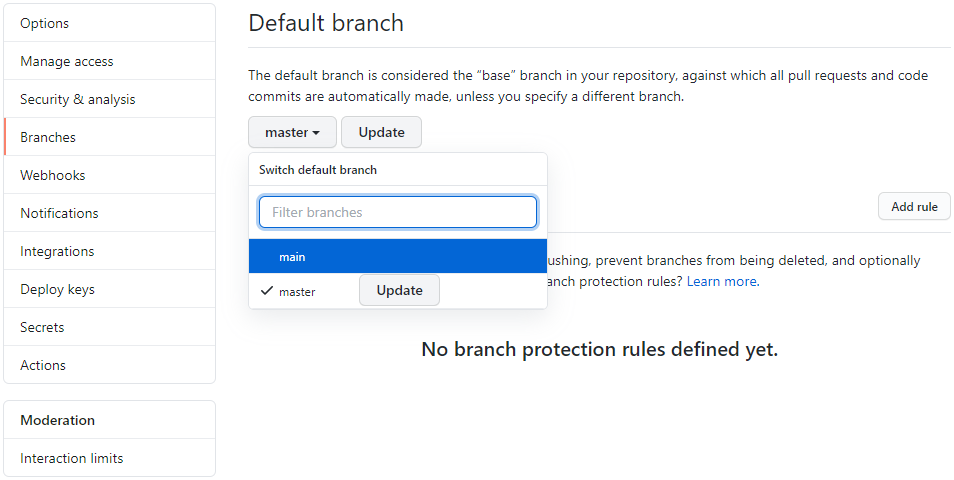
If you go to GitHub now, youl’ll see both main and master present with master still being the default. To change this you’ll need to go into the repository settings and switch default branch there.

Only once that step is done, you can delete master branch forever.

git push origin --delete master

Now the existing repository now has main as the default branch name.

As you can see, currently this process is a bit involved and I am sure that GitHub will automate it reasonably soon. You might want to wait with local renames until they do. My plan is to update branch names as I push updates to my projects. Active repositories will get the update sooner while some old repositories might stay with master forever.

That’s all fine and dandy but what about the new repositories? Well, there’s a setting for that too. Just adjust init.defaultBranch Git property.

git config --global init.defaultBranch main

And now you’re ready to roll.


PS: I will not get into politics whether this change was necessary or not. As a Croat, I will never fully understand the slavery and the emotional impact having the master branch might have. For me this change is more of pragmatism. The exact name doesn’t matter much to me and main is a better choice anyhow.

On-screen Measurement Grid

Illustration

When shopping for gloves it is really useful to know hand size. Normal person would find a measuring tape. Me? I decided to make a on-screen measurement grid.

First step is just figuring pixel dimensions in relation to my diagonal. A bit of Pythagorean later, the following proved to be what I needed:

var diagonal = 15.6;
var pixelWidth = 1920;
var pixelHeight = 1080;

var ratio = 16.0 / 9;
var height = diagonal / Math.Sqrt(ratio * ratio + 1);
var width = height * ratio;  // not really needed

var pixelsPerInch = pixelHeight / height;

var inchWidth = pixelWidth / pixelsPerInch;
var inchHeight = pixelHeight / pixelsPerInch;

Notice here that I am using “witchcraft” units instead of millimetres as I normally would. Reason for that is simple - I was buying gloves on USA site and all measurements were in inches. My screen measurement was also in inches. With both these units being the same, it made no sense to convert into something else first.

Also notice I am only using height to determine pixel density thus making an assumption pixel is a perfect square. Unless you are dealing with something really strange, this assumption is perfectly good.

With these basic calculations done, it’s time to draw. Notice I have a few multiplications/divisions by 4 hear - the only reason for these is due to me finding inch-based grid way too coarse. A quarter-inch grid gives a bit more flexibility here.

using (var bmp = new Bitmap(pixelWidth, pixelHeight))
{
    using (var g = Graphics.FromImage(bmp))
    {
        g.FillRectangle(Brushes.White, 0, 0, pixelWidth, pixelHeight);

        for (var i = 0; i < (int)Math.Ceiling(inchWidth) * 4; i++) {
            var pen = (i % 4 == 0) ? Pens.Black : Pens.LightBlue;
            var x = (int)(i / 4.0 * pixelsPerInch);
            g.DrawLine(pen, x, 0, x, pixelHeight);
        }

        for (var i = 0; i < (int)Math.Ceiling(inchHeight) * 4; i++)
        {
            var pen = (i % 4 == 0) ? Pens.Black : Pens.LightBlue;
            var y = (int)(i / 4.0 * pixelsPerInch);
            g.DrawLine(pen, 0, y, pixelWidth, y);
        }
    }
    bmp.Save("Background.png");
}

I made this image my background and voila! Now I can measure my hand without ever leaving my chair.

Dark Mode for QT Application

With dark mode becoming quite fast the default setup for many, I figured having it in the new QText wouldn’t hurt. And with QT it’s easy - surprisingly so. Just start with a good style (i.e. Fusion) and adjust its palette. And that’s all it took.

qApp->setStyle(QStyleFactory::create("Fusion"));

QPalette newPalette;
newPalette.setColor(QPalette::Window,          QColor( 37,  37,  37));
newPalette.setColor(QPalette::WindowText,      QColor(212, 212, 212));
newPalette.setColor(QPalette::Base,            QColor( 60,  60,  60));
newPalette.setColor(QPalette::AlternateBase,   QColor( 45,  45,  45));
newPalette.setColor(QPalette::PlaceholderText, QColor(127, 127, 127));
newPalette.setColor(QPalette::Text,            QColor(212, 212, 212));
newPalette.setColor(QPalette::Button,          QColor( 45,  45,  45));
newPalette.setColor(QPalette::ButtonText,      QColor(212, 212, 212));
newPalette.setColor(QPalette::BrightText,      QColor(240, 240, 240));
newPalette.setColor(QPalette::Highlight,       QColor( 38,  79, 120));
newPalette.setColor(QPalette::HighlightedText, QColor(240, 240, 240));

newPalette.setColor(QPalette::Light,           QColor( 60,  60,  60));
newPalette.setColor(QPalette::Midlight,        QColor( 52,  52,  52));
newPalette.setColor(QPalette::Dark,            QColor( 30,  30,  30) );
newPalette.setColor(QPalette::Mid,             QColor( 37,  37,  37));
newPalette.setColor(QPalette::Shadow,          QColor( 0,    0,   0));

newPalette.setColor(QPalette::Disabled, QPalette::Text, QColor(127, 127, 127));

qApp->setPalette(newPalette);

PS: Ok, chances are that you will need another iconset but that’s the story for some other time.

SignTool Failing with 0x80096005

After creating a new setup package I noticed my certificate signing wasn’t working. I kept getting error while running the same signing command I always had.

sign -s "My" -sha1 $CERTIFICATE_THUMBPRINT -tr ^^http://timestamp.comodoca.com/rfc3161^^ -v App.exe
 SignTool Error: An unexpected internal error has occurred.
 Error information: "Error: SignerSign() failed." (-2146869243/0x80096005)

A bit of troubleshooting later and I narrowed my problem to the timestamping server as removing /tr option made it work as usually (albeit without the timestamping portion). There were some certificate changes for the timestamp server but I don’t believe this was the issue as the new certificate was ok and I remember their server occasionally not working for days even before this.

And then I remembered what I did the last time Comodo’s timestamp server crapped out. Quite often you can use other, more reliable, timestamp server. In my case I went with timestamp.digicert.com.

sign -s "My" -sha1 $CERTIFICATE_THUMBPRINT -tr ^^http://timestamp.digicert.com^^ -v App.exe
 Successfully signed: App.exe

PS: This same error might happen due to servers refusing SHA-1.

Fixing Git Author Name and Email

After moving Mercurial repository to Git you might want to update user names and emails.

The first step would be to see the all the names:

git log --format='%an <%ae>' | git log --format='%cn <%ce>' | sort | uniq

With this information in hand, we can adjust names with filter-branch:

git filter-branch --force --commit-filter '
    OLD_NAME="^^unknown^^"
    NEW_NAME="^^My name^^"
    NEW_EMAIL="^^myemail@example.com^^"
    if [ "$GIT_AUTHOR_NAME" = "$OLD_NAME" ]; then
        GIT_AUTHOR_NAME="$NEW_NAME"
        GIT_AUTHOR_EMAIL="$NEW_EMAIL"
    fi
    if [ "$GIT_COMMITTER_NAME" = "$OLD_NAME" ]; then
        GIT_COMMITTER_NAME="$NEW_NAME"
        GIT_COMMITTER_EMAIL="$NEW_EMAIL"
    fi
    git commit-tree "$@";
' --tag-name-filter cat -- --branches --tags --all

git for-each-ref --format='delete %(refname)' refs/original | git update-ref --stdin

Using TLS 1.3 from .NET 4.0 Application

Due to ubiquitous support for .NET 4.0 on all Windows platforms (including Windows 10) out-of-box, I still keep most of my freeware apps on it. Yes, I lose some new fancy features but not dealing with .NET Framework download makes it really convenient. But there is one thing that proved to be a problem - TLS 1.3.

When I changed my web server to use only TLS 1.2 and above, built-in upgrade suddenly stopped working. Digging a bit showed reason was that .NET 4.0 supported only TLS 1.0 by default and my web server where upgrades were located required TLS 1.2 at the minimum.

For the latest .NET versions, updating to a higher TLS is easy enough:

ServicePointManager.SecurityProtocol = SecurityProtocolType.Tls13
                                     | SecurityProtocolType.Tls12
                                     | SecurityProtocolType.Tls11
                                     | SecurityProtocolType.Tls;

But Tls11, Tls12, and Tls13 enums are not part of .NET 4.0. However, because .NET is so closely integrated with Windows, sometime it’s worth asking it directly - by specifying enum’s numerical value:

ServicePointManager.SecurityProtocol = (SecurityProtocolType)12288
                                     | (SecurityProtocolType)3072
                                     | (SecurityProtocolType)768
                                     | SecurityProtocolType.Tls;

If you run this code before making the first HTTP request, suddenly you are not limited to the SSL and the ancient TLS anymore.

As this code still requires a bit of error checking, I finally ended up with the function below:

try { //try TLS 1.3
    ServicePointManager.SecurityProtocol = (SecurityProtocolType)12288
                                         | (SecurityProtocolType)3072
                                         | (SecurityProtocolType)768
                                         | SecurityProtocolType.Tls;
} catch (NotSupportedException) {
    try { //try TLS 1.2
        ServicePointManager.SecurityProtocol = (SecurityProtocolType)3072
                                             | (SecurityProtocolType)768
                                             | SecurityProtocolType.Tls;
    } catch (NotSupportedException) {
        try { //try TLS 1.1
            ServicePointManager.SecurityProtocol = (SecurityProtocolType)768
                                                 | SecurityProtocolType.Tls;
        } catch (NotSupportedException) { //TLS 1.0
            ServicePointManager.SecurityProtocol = SecurityProtocolType.Tls;
        }
    }
}

This code ensures the highest TLS is supported even from the poor old .NET 4.0.

Unique Machine ID

Every once in a while I need to uniquely identify a machine. I don’t case about its name or properties. I just want something unique to key off and ideally I want its format to be the same on both Windows and Linux.

On Linux you can use content of /etc/machine-id. On pretty much all distributions I’ve tried this file will be generated on install and will contain UUID. For Windows, one must look in Registry. Under HKEY_LOCAL_MACHINE\SOFTWARE\Microsoft\Cryptography\MachineGuid Windows will keep their unique identifier also in UUID format (albeit with dashes this time).


PS: Note these values can be manually changed by user so you cannot really depend on them for security purposes (e.g. generating licenses). But for machine identification they’ll do.

Adding Space Before Equals in Git Prompt

I like using Git-Prompt to decorate my bash prompt. It’s nice, simple, and it would be perfect if it didn’t put equals next to branch name. Not sure what I’m talking about?

If you have modified files, Git-Prompt will make sure to let you know by writing master %= in prompt line. If you want to quickly copy branch name, you simply double click it and only master is selected. However, when there are no modifications to Git tree, output will be master=. Notice the lack of space. When you double click on this, both branch name and equals sign get copied. What I want is to have a space no matter whether branch is modified or not.

Cause for this issue can be found in the following line

local gitstring="$c$b^^${f:+$z$f}^^$r$p"

This makes it for that extra flags get space. If there are no flags, there is no space. Solution is simple - just add space always thus changing line like this:

local gitstring="$c$b$z$f$r$p"

Or, if you like to do it programmatically:

sed -i 's/local gitstring=.*/local gitstring=$c$b$z$f$r$p/' ~/.git-prompt.sh

PS: If you are wondering, this is how my prompt setup looks:

LC_COLLATE=C

if [ -f ~/.git-prompt.sh ]; then
    GIT_PS1_SHOWDIRTYSTATE=true
    GIT_PS1_SHOWSTASHSTATE=true
    GIT_PS1_SHOWUNTRACKEDFILES=true
    GIT_PS1_SHOWUPSTREAM="auto"
    GIT_PS1_STATESEPARATOR=" "
    GIT_PS1_DESCRIBE_STYLE="default"
    GIT_PS1_SHOWCOLORHINTS=true
    GIT_PS1_HIDE_IF_PWD_IGNORED=
    . ~/.git-prompt.sh
fi

function ps1_timer_start {
    PS1_TIMER=${PS1_TIMER:-$SECONDS}
}

function ps1_timer_stop {
    PS1_TIMER_VALUE=$(($SECONDS-$PS1_TIMER))
    if [[ $PS1_TIMER_VALUE -eq 0 ]]; then
        PS1_TIMER_VALUE=""
    elif [[ $PS1_TIMER_VALUE -lt 60 ]]; then
        PS1_TIMER_VALUE=" ${PS1_TIMER_VALUE}s"
    else
        PS1_TIMER_VALUE=" $((PS1_TIMER_VALUE / 60))m$((PS1_TIMER_VALUE % 60))s"
    fi
  unset PS1_TIMER
}

trap 'ps1_timer_start' DEBUG
PROMPT_COMMAND=ps1_timer_stop

PS1='\[\e[36m\]\n\u@\h\[\e[0m\] \w\[\e[34m\]$PS1_TIMER_VALUE\[\e[37m\] \[\e[36m\]\[\e[7m\]`__git_ps1 " %s "`\[\e[0m\]\n\[\e[36m\]\\$\[\e[0m\] '

Bimil failing with FontFamilyNotFound

While Bimil is primarily Windows application, I use it regularly on Linux. However, when I tried running it on freshly installed Linux Mint 19.3, I was greeted with a quick crash.

Running it from console did shine a bit more light onto the situation as the following line was quite noticeable: [ERROR] FATAL UNHANDLED EXCEPTION: System.ArgumentException: The requested FontFamily could not be found [GDI+ status: FontFamilyNotFound].

As mono is Windows Forms application written in C#, running it on Linux requires a few packages extra. Most of them are actually taken care of with the installation of mono-complete. However, in Linux mint, I found one other dependency I was not aware of - Microsoft fonts.

Solution?

sudo apt-get install ttf-mscorefonts-installer