Programming in C#, Java, and god knows what not

CA2000 and Using Statement

I started with code like this (give-or-take few white-spaces):

using (var aes = new RijndaelManaged() { BlockSize = 128, KeySize = 256, Key = key, IV = iv, Mode = CipherMode.CBC, Padding = PaddingMode.PKCS7 }) {
    this.Transform = aes.CreateEncryptor();
    this.Stream = new CryptoStream(stream, this.Transform, CryptoStreamMode.Write);
}
Running code analysis on this returned [CA2000](http://msdn.microsoft.com/query/dev10.query?appId=Dev10IDEF1&k=k(%22DISPOSE+OBJECTS+BEFORE+LOSING+SCOPE%22)) (Microsoft.Reliability) error. It simply stated “In method ‘Aes256CbcStream.Aes256CbcStream(Stream, CryptoStreamMode, byte[])’, object ‘<>g__initLocal0’ is not disposed along all exception paths. Call System.IDisposable.Dispose on object ‘<>g__initLocal0’ before all references to it are out of scope.”

Problem here is that all object references ARE being released by using statement. Or so I thought.

If you are using Object Initializer, compiler will generate code to support it. And that compiler-generated code is culprit for that message. And yes, there is a reason for why it behaves like this.

Personally I often ignore this warning. Strictly speaking this is not a real solution and definitely not a best practice. However it is quite often acceptable. If you are generating just few of these objects and there is no failure expected (famous last words), little bit more work for garbage collector is acceptable scenario.

Real solution for now would be not to use Object Initializer syntax when dealing with using statement. In our example that would mean:

using (var aes = new RijndaelManaged()) {
    aes.BlockSize = 128;
    aes.KeySize = 256;
    aes.Key = key;
    aes.IV = iv;
    aes.Mode = CipherMode.CBC;
    aes.Padding = PaddingMode.PKCS7;
    this.Transform = aes.CreateEncryptor();
    this.Stream = new CryptoStream(stream, this.Transform, CryptoStreamMode.Write);
}

Case for TryGetValue

When I am reviewing code, I always check how program retrieved items from dictionary. Most often I find following pattern:

if (dict.ContainsKey(key)) {
    object obj = dict[key];
    //do something with obj
}

Whenever I see it, I wonder why somebody would use it over TryGetValue:

object obj;
if (dict.TryGetValue(i, out obj)) {
    //do something with obj
}

If you deal with dictionary of objects, later code is something around 25% (depends on size of dictionary and bunch of other stuff) faster. If you deal with dictionary of structures, difference is much smaller (7-8%) since in later case you need to deal with memory allocations (remember that there is no null for structures).

Most of the time, dictionaries are used in time critical code so changing code to later is almost a no-brainer.

I only ever came to see one single scenario where key check separated from retrieval is desired. On case your dictionary has structures in it and you expect lot of look-up failures you will be better off using first example. Second code will use much more memory and need to create structure before each key check will offset any time savings you might get when item is found.

Get a Float From RandomNumberGenerator

Standard Random class works perfectly fine most of time. However, on bigger sample, you will see some non-random tendencies. Much better random source is RandomNumberGenerator.

Unfortunately RandomNumberGenerator does not actually return random numbers. It returns random bytes. It is our duty to change those random bytes to single double value ranging from 0 to 1 (as from NextDouble function).

Idea is to get 4 random bytes and to convert them to unsigned integer (negative numbers are so passé). If that number was to be in 0 to 1 range it would be enough to divide it by UInt32.MaxValue. Since we need result to be less than 1, we have slightly larger divisor:

private RandomNumberGenerator Rnd;

private double GetRandom() {
    if (this.Rnd == null) { this.Rnd = RandomNumberGenerator.Create(); }
    var bytes = new byte[4];
    this.Rnd.GetBytes(bytes);
    var number = BitConverter.ToUInt32(bytes, 0);
    return number / (UInt32.MaxValue + 1.0);
}

Not Too Unique

My personal favorite when it comes to databases is Microsoft SQL Server. However, reality dictates that I sometime have to use different database. Actually quite often I need to have one application supporting different database servers. I might need application to work on SQL Server, PostgreSQL and (god forbid) Oracle.

With time I got used to prefer standardized parts of SQL. It makes life a lot simpler and SQL Server is usually ok with that plan. Except when it comes to NULLs where things can get little bit quirky. Setting ANSI_NULLS to true does sort most of issues but one.

If you have unique index on nullable column, SQL compliant behavior is to force uniqueness on all values except null ones. That means that having "a", "b", null, null is valid scenario. In SQL Server that second null will not be allowed under premise that such value already exists and thus violates unique index. That “feature” is part of SQL Server since it’s very first days and it is very unlikely that it will be changed in the future. Compatibility is a bitch sometime.

Fortunately there is a workaround since SQL Server 2008 in form of filtered indexes. That enables unique index on only some values. In our scenario we just need to ignore nulls and standard behavior here we come:

CREATE UNIQUE INDEX UX_MyIndex ON MyTable(MyColumn) WHERE MyColumn IS NOT NULL;

PBKDF2 With SHA-256 (And Others)

.NET has built-in class handling all your PBKDF2 needs. It is called Rfc2898DeriveBytes and it works as long as you stick to SHA-1 HMAC. If your needs move in direction of SHA-256, you are out of luck.

Therefore I created Pbkdf2 class that takes any HMAC algorithm (e.g. SHA-1, SHA-256 or SHA-512) as input and allows you to derive key based on it.

using (var hmac = new HMACSHA256()) {
    var df = new Pbkdf2(hmac, password, salt, iterations);
    Console.WriteLine(BitConverter.ToString(df.GetBytes(32)));
}

Full code is available for download.

Resolving Embedded XML

Illustration

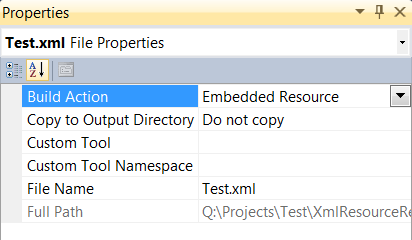
One of my fetishes is including as much resources as possible within the executable. This is fairly easy to do with Visual Studio. Just select desired file and change Build Action property to Embedded Resource.

Biggest benefit is that you can count on file always being there. There is no need to add file to installer nor to do error handling. And, even when you need to have user-modifiable files, you can always tuck away safe defaults far out of reach of an inexperienced user.

When you have XML file stored as this, loading is as easy as it gets:

var doc = new XmlDocument();
var stream = Assembly.GetExecutingAssembly().GetManifestResourceStream(&quot;project.example.xml&quot;);
doc.Load(stream);

However, when you have that same file linked to it’s DTD (Document Type Definition) things get ugly. Only thing that we get with our function is FileNotFoundException with Could not find file 'C:\somepath\example.dtd'. Things do not change even when DTD is embedded next to XML. As you can see from exception, our XmlDocument is stubbornly reading DTD from disk instead from resources.

Easiest solution is to delete referring DOCTYPE from XML document. However, that is double-edged sword since that also means that you lose quite a good helping hand in detecting early errors. I will not even go into how (properly created) DTD can be huge help with intellisense during XML editing.

Better solution would be to use XmlDocument’s existing XmlResolver property. XmlResolver is what actually handles from where each stream is read. If we inherit that class we can make critical change to read DTD from resource stream instead from file system. And it all fits in single overridden function:

public override object GetEntity(Uri absoluteUri, string role, Type ofObjectToReturn) {
    var fileName = absoluteUri.Segments[absoluteUri.Segments.Length - 1];
    var resourceName = &quot;project.&quot; + fileName;
    var resourceStream = Assembly.GetExecutingAssembly().GetManifestResourceStream(resourceName);
    return resourceStream;
}

Code will just check which file name is required and return matching embedded resource stream. Loading XML stays almost same:

var doc = new XmlDocument();
doc.XmlResolver = MyResolver();
var stream = Assembly.GetExecutingAssembly().GetManifestResourceStream(&quot;project.example.xml&quot;);
doc.Load(stream);

P.S. Do notice that above are excerpts from little bit bigger code. Full sample is available for download.

IPv6 Multicast

Last post dealt with sending same message to multiple clients in IPv4. Since IPv4 pool is almost gone, we might as well see how to do it in IPv6.

Believe it or not, code is virtually identical:

this.Socket = new Socket(AddressFamily.InterNetworkV6, SocketType.Dgram, ProtocolType.Udp);
this.Socket.SetSocketOption(SocketOptionLevel.Socket, SocketOptionName.ReuseAddress, true);
this.Socket.Bind(new IPEndPoint(IPAddress.IPv6Any, 65535));
this.Socket.SetSocketOption(SocketOptionLevel.IPv6, SocketOptionName.AddMembership, new IPv6MulticastOption(IPAddress.Parse(&quot;ff08::1&quot;)));

Just use socket as you would normally do.

Code example is available for download.

P.S. For this example I used ff08::1 as multicast address. You might want to change this to something not as usual as this (but compliant to ffx8::/16). E.g. ff28::1:2:3:4:5 might do the trick.

Multicast

Whenever there is need to distribute same data to multiple applications over network I tend to see same thing. Everybody just makes broadcast socket. That is usually wrong way to do it.

From the very beginning of IP, there is special class called multicast addresses. Idea is simple: you “join” multicast address and whatever you send to it is received by everybody else who joined.

While this might seem a lot like broadcast, it is not the same thing. If you have network of 100 computers and only two need to talk, broadcast will send same data to 100 of them anyway. In multicast case switch can optimize this and send data only to two computers that need it.

Even in case of dumb switch which behaves with multicast in same manner as with broadcast, there is benefit. Since multicast addresses reside in completely different range, there is no fear that we will interfere with any normal socket that is listening on same port. Yes, we might stumble at another multicast group by accident but chances are pretty slim.

Creation of multicast socket is quite similar to creation of any other socket:

this.Socket = new Socket(AddressFamily.InterNetwork, SocketType.Dgram, ProtocolType.Udp);
this.Socket.SetSocketOption(SocketOptionLevel.Socket, SocketOptionName.ReuseAddress, true);
this.Socket.Bind(new IPEndPoint(IPAddress.Any, 65535));
this.Socket.SetSocketOption(SocketOptionLevel.IP, SocketOptionName.AddMembership, new MulticastOption(IPAddress.Parse(&quot;239.192.0.1&quot;), IPAddress.Any));

As you can see, only real difference is in additional socket option that adds our socket to multicast group (do not forget do remove it on application exit).

And that is it. Everything else works as it would with “normal” socket.

Code example is available for download.

P.S. For this example I use multicast address of 239.192.0.1. You might want to change this to something not as usual as this (but still in 239.192.0.0 range).

SQL Server 2012

If you happen to be MSDN subscriber, there is new treat for you. SQL Server 2012 is available for download.

For those as cheap as me, there is SQL Server 2012 Express. For some reason it is still listed as beta, but I expect to see RTM version soon enough.

Biggest feature in my book would be LocalDB. On first glance it would be same thing as SQL Server Compact. However, if you dig a bit deeper, you will see that it has few subtle differences.

For me LocalDB is missing link that brings SQL Server data and TSQL without need for full-blown SQL Server install. Compared to Compact, it is bigger and not as easily distributed. On other hand, upgrade between LocalDB and full SQL Server should be a breeze. This one goes on my system immediately. Check more details.

Yes, there are other changes, but I will leave each one of you to pick a favorite.

Shield Button

Windows Vista introduced us to UAC. One cornerstone for developers was displaying shield next to a button that requires elevation. And it is shame that most application still don’t draw it.

Code is really simple:

var hIcon = NativeMethods.LoadImageW(IntPtr.Zero, NativeMethods.IDI_SHIELD, NativeMethods.IMAGE_ICON, 24, 24, NativeMethods.LR_DEFAULTCOLOR);
if (!hIcon.Equals(System.IntPtr.Zero)) {
    var icon = System.Drawing.Icon.FromHandle(hIcon);
    if (icon != null) {
        this.TextImageRelation = TextImageRelation.ImageBeforeText;
        this.Image = icon.ToBitmap();
    }
}

As you can see, all things are done in first line. Using Interop we request for a system’s shield icon, sized 24x24 pixels in default color. All other lines are there just to be sure that something was loaded and you are not crashing if not (e.g. if you are running XP).

Notice that one could use SystemInformation.SmallIcon to determine “proper” icon size. Unfortunately that will not have nice result for icon sizes that are not 16x16, 24x24 and 32x32. You could always do some fancy smoothing but at such small icon sizes I think it is best to go for something that is of native size.

As example I took liberty to make Button control with UAC shield. Full source is available for download.