Programming in C#, Java, and god knows what not

Single Parent

Quite a few applications have both menu (MenuStrip control) and toolbar (ToolStrip control). Both of these controls have their menu containers. In case of MenuStrip this is ToolStripMenuItem and in case of ToolStrip we can use ToolStripSplitButton to get same effect. Both of those controls share DropDownItems property and with this you could make one ToolStripMenuItem and add it to both:

var newItem = new ToolStripMenuItem("Test");
newItem.Click += new EventHandler(newItem_Click);
toolStripMenuItem1.DropDownItems.Add(newItem);
toolStripSplitButton1.DropDownItems.Add(newItem);

This code looks nice but it does not work. In this case we will get Test added to toolStripSplitButton1 only.

Culprit for this is in SetOwner method (as seen with Reflector):

private void SetOwner(ToolStripItem item) {
    if (this.itemsCollection && (item != null)) {
        if (item.Owner != null) {
            item.Owner.Items.Remove(item);
        }
        item.SetOwner(this.owner);
        if (item.Renderer != null) {
            item.Renderer.InitializeItem(item);
        }
    }
}

As you can see, if item already has an owner, that owner is removed, and only than new owner is set.

Only solution is to create two new items and assign each to their own parent control:

var newItem1 = new ToolStripMenuItem("Test");
newItem1.Click += new EventHandler(newItem_Click);
toolStripMenuItem1.DropDownItems.Add(newItem1);

var newItem2 = new ToolStripMenuItem("Test");
newItem2.Click += new EventHandler(newItem_Click);
toolStripSplitButton1.DropDownItems.Add(newItem2);

While this means that you have two pieces of same code, you can find consolidation in fact that event handler methods can be reused.

One Step Back

I was more than surprised to find that Visual Studio 2010 (beta 1) has moved from “Any CPU” as default platform target to “x86”. In short, every application you create with Visual Studio 2010, will not run on 64-bit Windows without compatibility layer (WOW64).

While this may seem like a minor change, I consider it a major problem in 64-bit programming. When Visual Studio 2008 defaulted to Any CPU, that did caused whole range of bugs and errors. However, by resolving those errors, developer was at least somewhat introduced to problems with his code in 64-bit environment. If he could not resolve it, he would switch it manually to 32-bit.

This change just seems like allowing careless developers to stay careless. In short time, this will not cause too much problems, but in long run you will get bunch of code that requires 32-bit compatibility layer (32-bit Windows will not be with us forever).

Why Shouldn't I Sign My Code

While ago I talked about reasons for signing your executables. Now I will tell something about reasons against it.

Speed issues

In certain situations loading of .NET assemblies may be delayed. While usually this is not visible that much, it is something to keep in mind.

Not having trusted root certificate

If you don’t have one of trusted root certificates (e.g. VeriSign’s) you cannot count on Windows recognizing your signature. You will get same prompt as unsigned applications (on Windows Vista and 7). While your application may be signed, your users will not see that.

What do I do?

I do not sign my assemblies. I did try it for a while, but without proper certificate (expensive one), there is just no reason to do it.

However, I do strong-name my assemblies. This is not exactly same as signing them but it does provide you with integrity check which is only thing that I really need.

Reordering TabPages Inside TabControl

When using TabControl in my programs, usually there is one thing users always ask for - “let me reorder those tabs”. Since reordering tabs is such a logical operation, one would think that the mighty .NET 2.0 Framework has one. But no luck there. Visual Studio 2008 does have that feature, but framework mortals are not blessed with it.

Since Visual Basic programmers waited for inheritance for far too long, they tend to use it for solving every possible problem (when you have a hammer, all problems look like nails). May I say that here, the same inheritance approach will be used. :)

What we want to do here is to extend the standard TabControl. Inside of it, we are interested in MouseDown, MouseMove and MouseUp events. Some people like to use drag and drop here, but that seems to me like using a bomb to kill a fly.

MouseDown

Upon receiving a MouseDown event, we check if the Left button is used and if TabControl has tab selected. If those requirements are fulfilled, we initialize the SourceTabPage variable. With that, we are ready for further events.

MouseMove

When the mouse is moved, one must check if reordering is in progress. If that is true, we look at what TabPage is under it. If it is not starting one - we have a show.

One of the things we must discover is which TabPage we are hovering over. Since unfortunately, we cannot use some sort of HitText, we must iterate through all TabPages and select one with our coordinates.

After that, we check which side we are hovering. It is only important if you wish to display a different cursor for each side. These two are the ones I use, but you can think of your own schema.

MouseUp

Here, we must know on which side we are since the new location (before or after hovering TabPage) depends on this information. This code is basically the same as the one we use for determining the cursor type. After clearing is done, so is our function.

Conclusion

This extended control offers a good solution to reordering TabPages inside a TabControl. I think that the only thing one may hold against it is updating the order on MouseUp but that decision is made for the sake of speed and code clarity. This way, it is very easy to implement changes through further extending since it uses protected OnMouseX procedures.

There is source code available in both VB.NET and C#. Hope you like it.

P.S.

This is redoing of my Code Project article.

Intellisense 10-4

Illustration

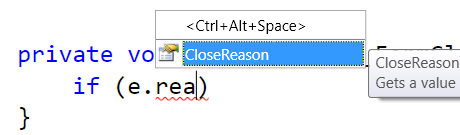
While C#'s IntelliSense was always good, in Visual Studio 2010 they enhanced it even more. When one writes e.g. “reason”, it will also match CloseReason. While this may not seem much, it is gem if you do not remember exact property name.

Small feature that helps a lot.

Creating Virtual Disk

After open and attach, most common virtual disk operation will be create.

Here it is:

string fileName = @"D:\test.vhd";

long size = 128 * 1024 * 1024;

IntPtr handle = IntPtr.Zero;

var parameters = new CREATE_VIRTUAL_DISK_PARAMETERS();
parameters.Version = CREATE_VIRTUAL_DISK_VERSION.CREATE_VIRTUAL_DISK_VERSION_1;
parameters.Version1.BlockSizeInBytes = 0;
parameters.Version1.MaximumSize = size;
parameters.Version1.ParentPath = IntPtr.Zero;
parameters.Version1.SectorSizeInBytes = CREATE_VIRTUAL_DISK_PARAMETERS_DEFAULT_SECTOR_SIZE;
parameters.Version1.SourcePath = IntPtr.Zero;
parameters.Version1.UniqueId = Guid.Empty;

var storageType = new VIRTUAL_STORAGE_TYPE();
storageType.DeviceId = VIRTUAL_STORAGE_TYPE_DEVICE_VHD;
storageType.VendorId = VIRTUAL_STORAGE_TYPE_VENDOR_MICROSOFT;

int res = CreateVirtualDisk(ref storageType, fileName, VIRTUAL_DISK_ACCESS_MASK.VIRTUAL_DISK_ACCESS_ALL, IntPtr.Zero, CREATE_VIRTUAL_DISK_FLAG.CREATE_VIRTUAL_DISK_FLAG_FULL_PHYSICAL_ALLOCATION, 0, ref parameters, IntPtr.Zero, ref handle);
if (res == ERROR_SUCCESS) {
} else {
    throw new InvalidOperationException(string.Format(CultureInfo.InvariantCulture, "Native error {0}.", res));
}

// close handle to disk
CloseHandle(handle);

System.Windows.Forms.MessageBox.Show("Disk is created.");

Of course, in order for this to work, few P/Interop definitions are needed:

public const Int32 ERROR_SUCCESS = 0;

public const int CREATE_VIRTUAL_DISK_PARAMETERS_DEFAULT_SECTOR_SIZE = 0x200;
public const int VIRTUAL_STORAGE_TYPE_DEVICE_VHD = 2;
public static readonly Guid VIRTUAL_STORAGE_TYPE_VENDOR_MICROSOFT = new Guid("EC984AEC-A0F9-47e9-901F-71415A66345B");

public enum CREATE_VIRTUAL_DISK_FLAG : int {
  CREATE_VIRTUAL_DISK_FLAG_NONE                     = 0x00000000,
  CREATE_VIRTUAL_DISK_FLAG_FULL_PHYSICAL_ALLOCATION = 0x00000001
}

public enum CREATE_VIRTUAL_DISK_VERSION : int {
  CREATE_VIRTUAL_DISK_VERSION_UNSPECIFIED = 0,
  CREATE_VIRTUAL_DISK_VERSION_1            = 1
}

public enum VIRTUAL_DISK_ACCESS_MASK : int {
  VIRTUAL_DISK_ACCESS_ATTACH_RO = 0x00010000,
  VIRTUAL_DISK_ACCESS_ATTACH_RW = 0x00020000,
  VIRTUAL_DISK_ACCESS_DETACH    = 0x00040000,
  VIRTUAL_DISK_ACCESS_GET_INFO  = 0x00080000,
  VIRTUAL_DISK_ACCESS_CREATE    = 0x00100000,
  VIRTUAL_DISK_ACCESS_METAOPS   = 0x00200000,
  VIRTUAL_DISK_ACCESS_READ      = 0x000d0000,
  VIRTUAL_DISK_ACCESS_ALL       = 0x003f0000,
  VIRTUAL_DISK_ACCESS_WRITABLE  = 0x00320000
}


[StructLayout(LayoutKind.Sequential, CharSet = CharSet.Unicode)]
public struct CREATE_VIRTUAL_DISK_PARAMETERS {
  public CREATE_VIRTUAL_DISK_VERSION Version;
  public CREATE_VIRTUAL_DISK_PARAMETERS_Version1 Version1;
}

[StructLayout(LayoutKind.Sequential, CharSet = CharSet.Unicode)]
public struct CREATE_VIRTUAL_DISK_PARAMETERS_Version1 {
  public Guid UniqueId;
  public Int64 MaximumSize;
  public Int32 BlockSizeInBytes;
  public Int32 SectorSizeInBytes;
  public IntPtr ParentPath;
  public IntPtr SourcePath;
}

[StructLayout(LayoutKind.Sequential, CharSet = CharSet.Unicode)]
public struct VIRTUAL_STORAGE_TYPE {
  public Int32 DeviceId;
  public Guid VendorId;
}


[DllImportAttribute("kernel32.dll", SetLastError = true)]
[return: MarshalAsAttribute(UnmanagedType.Bool)]
public static extern Boolean CloseHandle(IntPtr hObject);

[DllImport("virtdisk.dll", CharSet = CharSet.Unicode)]
public static extern Int32 CreateVirtualDisk(ref VIRTUAL_STORAGE_TYPE VirtualStorageType, String Path, VIRTUAL_DISK_ACCESS_MASK VirtualDiskAccessMask, IntPtr SecurityDescriptor, CREATE_VIRTUAL_DISK_FLAG Flags, int ProviderSpecificFlags, ref CREATE_VIRTUAL_DISK_PARAMETERS Parameters, IntPtr Overlapped, ref IntPtr Handle);

I think that this is as short as it gets without hard-coding values too much.

If you hate copy/paste, you can download this code sample. Notice that this code only creates virtual disk. If you want to take a look at more details, check full code sample.

P.S. Notice that this code will work with Windows 7 RC, but not with beta (API was changed in meantime).

P.P.S. If you get “Native error 1314.” exception, you didn’t run code as user with administrative rights. If you get “Native error 80.”, file you are trying to create is already there.
Visual Studio and WPF

Illustration

Visual Studio 2010 really shines with its new WPF interface. Side effect of this is relying little bit more on your graphics card. If graphics driver has a bug, you have a problem.

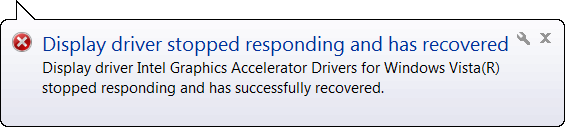
It seems that nobody at Microsoft tested their Visual Studio 2010 beta 1 with Intel’s GE45 integrated graphics. At least once per hour I get “Display driver stopped responding and had recovered” balloon. While this is not end of world, it is pretty annoying.

While this is probably driver problem, I cannot help but to put some blame on Microsoft since only application that ever caused this bug was Visual Studio 2010. Of course I need to blame myself a little also, since I am the one using both Windows 7 and Visual Studio 2010 in their beta stage.

[2009-07-22: New Intel graphics driver is issued over Windows Update with June 2009 markings. It seems that this driver solves problem. I used it for few hours straight without any issues. I do hope it stays that way.]

*WORD

In times of 8-bit systems byte (octet) was used to denote processors data size. When 16-bit computers appeared, WORD was used for sizes same as size of processor’s data bus. At those times, one WORD was equal to two bytes.

Once 32-bit computing came around, choice needed to be made. Whether to re-use WORD (but to alter it’s 16-bit era meaning) or to make new unit. DWORD (double WORD) was born to signify this new bus width. On 64-bit computers, natural choice was QWORD (quadruple WORD).

Is OWORD (octal WORD) next?

Why ULONG Is 32-Bit Even on 64-Bit Windows

When you prepare C#'s DllImport functions, remember that if you see ULONG, you need to convert it as Int32 (more precise would be UInt32). Although one would assume that ULONG would be 64-bit on 64-bit systems, it is actually four bytes on both 32-bit and 64-bit systems.

Reason this happens is Microsoft’s decision to use LLP64 data model for Windows API. This was done in order to ease switch to 64-bits for C++ programs. All API calls that were done on 32-bit systems that had ULONG in it, will work same even in 64-bit world. Easiest change is one that requires no action.

If you really want something with 64 bits, use ULONGLONG (or LONGLONG). This one is eight bytes in both 32-bit and 64-bit environment.

Beware if you see pointer to ULONG. Even if ULONG is four bytes on 64-bit platform, pointer to it is eight bytes. As matter of fact, all pointers are eight bytes.

Visual Studio 2010 Beta 1

I played a little with this thing and I can only say that I cannot believe that this is WPF application. I wanted to check how mobile development looks like but I could not find it in this version.

I really wanted to check whether Cellular Emulator finally works under 64-bit Windows but it seems that I will need to wait until next version.