Programming in C#, Java, and god knows what not

Weirdest Feature in C# 7

I love the new C# 7 candy. Some of them I use, some of them I will use rarely. However, there is one I don’t get at all.

Let’s imagine having a login class and a single method with kinda unusual out parameters:

public class Login {
    public string UserName { get; set; }
    public string Password { get; set; }

    public void Deconstruct(out string userName, out string password) {
        userName = UserName;
        password = Password;
    }
}

Normally you would expect to call this method as:

var login = new Login(...);

var userName, var password;
login.Deconstruct(out userName, out password);

With new out variables, this can be written a bit shorter and, in my opinion, more readable:

var login = new Login(...);
login.Deconstruct(out var userName, out var password);

What I wouldn’t expect for the life of me, would be a Tuple-like syntax:

(var userName, var password) = login;

Why?

Because it doesn’t use keyword, it doesn’t use interface, it doesn’t use attribute. Nope, it uses the magic method name. Yep method must be named Deconstruct and have two or more output parameters and the new syntax is yours to abuse.

And this is not me not liking tuples. I would be more than happy if this worked as a normal tuple returned from a more standard method call , e.g.:

(var userName, var password) = login.Deconstruct();
    public (string userName, string password) Deconstruct() {
        return (UserName, Password);
    }

I believe this magic name method is just simply a wrong way to introduce the new features. It is not discoverable, it doesn’t really read well, and it paves path for introduction of other magical method names. Didn’t IDispose and its Dispose() vs Dispose(bool) teach us anything?

I can just hope this single deviant feature among other sensible C# 7 features is just a price we pay for the night Hejlsberg got drunk. And I surely hope he will stay clean for C# 8. :)

Lazy<T>

Quite often in singleton classes you might find yourself doing the standard plumbing code like this:

private static MyClass _current = new MyClass();

public static MyClass Current {
    get { return _current; }
}

or a bit simpler with C# 7:

public static MyClass Current = new MyClass();

If class is a bit heavier (e.g. using lots of memory) you might do it lazily with a lock:

private static MyClass _current;

public static MyClass Current {
    get {
        lock(SyncRoot) {
            if (_current == null) { _current = new MyClass(); }
            return _current;
        }
    }
}

What almost never gets any love is Lazy construct known from .NET Framework 4:

private static Lazy<MyClass> _current = new Lazy<MyClass>();

public static MyClass Current {
    get { return _current.Value; }
}

This will initialize class on the first access, it is tread safe by default, and you can even use custom initializer if needed, e.g.:

private static Lazy<MyClass> _current = new Lazy<MyClass>(() =&gt; new MyClass(42));

public static MyClass Current {
    get { return _current.Value; }
}

Exactly what doctor prescribed. :)

PS: And stop using double-check locking.

My Most Favorite C# 7 Features

Illustration

With Visual Studio 2017 out and C# 7 in the wild we got a couple of new features. After using them for a while, here are my favorites.

Out Variables The change here is subtle and many would call it inconsequential but I love. Out variables can finally be declared inline instead of pre-declaring them above parsing statement. This small change makes code flow much smoother and, in my opinion, makes all the difference. For example, note the difference between these two code fragments:

int count;
if (int.TryParse(text, out count) && (count &gt; 1)) {
    //do something with count
}
if (int.TryParse(text, out **var** count) && (count &gt; 1)) {
    //do something with count
}

For rare cases when you don’t care about result you can also use underscore (_) character:

if (int.TryParse(text, out **var _**)) {
    //do something
}

Throw Expressions If you are creating classes for public consumption, quite often a big part of your code is boilerplate argument verification and throwing of exceptions. You can now merge usage of that argument with null coalescing or ternary operators. Again, nothing huge but makes code a bit more to the point:

if (text == null) { throw new ArgumentNullException(nameof(text), "Text cannot be null."); }
this.Text = text;

if (number &gt;= 2) { thrown new ArgumentOutOfRange(nameof(number), "Number must be 2 or more."); }
this.Number = number;
this.Text = text ?? **throw new ArgumentNullException(nameof(text), "Value cannot be null.")**;
this.Number = (number &gt;= 2) ? number : **throw new ArgumentOutOfRange(nameof(number), "Number must be 2 or more.")**;

Is Expressions Another change that seems small but it really improves code is just another style of as operator and it will probably cause its demise. It is a syntax candy allowing for inline variable declaration and a bit more readable code:

var comboBox = sender as ComboBox;
if (comboBox != null) {
    //do something with comboBox
}
if (sender is **ComboBox comboBox**) {
    /do something with comboBox
}

Local Functions And lastly, there are local functions. Again, these are nothing you couldn’t do before. I don’t think they are going to be used often most of the time. However, when you parse stuff or deal with state machines, they do come in handy as they do capture local variables.

Wish list

The only thing I still desire in C# as compared to other languages are enum methods. It is not a big thing but it would remove a whole set of helper methods and similar plumbing.

Parsing Double.MinValue

If you try converting double.MinValue to string and then back again, you will be greeted with OverflowException:

var text = double.MinValue.ToString(CultureInfo.InvariantCulture);
Console.WriteLine(text);
var number = double.Parse(text, NumberStyles.Float, CultureInfo.InvariantCulture);
Console.WriteLine(number);

Seemingly output string of -1.79769313486232E+308 is a bit lower than double would go despite the implicit promise minimum value makes: to be a minimum.

Reason for this is ToString() method not showing all the digits it can by default but actually a few less with a bit of rounding. This actually generally gives a better result (for example try 1.0/3). Last digit or two are noise anyhow due to the nature of double.

However, if we are emotionally connected to every possible digit or we need to parse stuff we give as output, there is a little thing called round-trip formatting. That works for Single, Double, and BigInteger data types and it consists of a single “r”:

var text = double.MinValue.ToString("r", CultureInfo.InvariantCulture);
Console.WriteLine(text);
var number = double.Parse(text, NumberStyles.Float, CultureInfo.InvariantCulture);
Console.WriteLine(number);

Now we get -1.7976931348623157E+308 as a text representation and parsing fails no more.

PS: Equivalent “issue” exists for .MaxValue.

Duplicates in Dictionary

If one needs to fill dictionary with bunch of keys while tracking only last value for each, a generic inner loop code might looks something like this:

if (dict.ContainsKey(key)) {
    dict[key] = value;
} else {
    dict.Add(key, value);
}

Code checks if key exists, if not it is added; otherwise the old value is replaced. Pretty straightforward.

Surprisingly, this code can be simplified - a lot:

dict[key] = value;

Dictionary’s indexed property will do exactly the same thing as code above - but in less lines.

Allowing Paste Linux Files Into a TextBox

If you are playing a lot with Linux, sooner or later you will see that pasting files produced by it will usually yield weird results on Windows as far as line ending goes.

You see, Linux uses Line Feed character (LF, ASCII 10) to signal the end of line. Windows uses a combination of Carriage Return and Line Feed (CRLF, ASCII 13+10). When Windows sees CRLF it will go to the next row. If it sees just LF, it will ignore it and you will see all in the same line unless application is a bit smarter. Unfortunately many are not.

Well, not much you can do about other people applications. However, you can ensure your application supports both CRLF and LF as a line ending. The only trick is to split text being pasted by CRLF, LF, and CR and to recombine it using CRLF (on Windows).

To catch paste, we can simply inherit existing TextBox control and override handling of WM_PASTE message:

internal class TextBoxEx : TextBox {
    protected override void WndProc(ref Message m) {
        if (m.Msg == NativeMethods.WM_PASTE) {
            if (Clipboard.ContainsText()) {
                var lines = Clipboard.GetText().Split(new string[] { "\r\n", "\n", "\r" }, StringSplitOptions.None);
                this.SelectedText = string.Join(Environment.NewLine, lines);
            }
        } else {
            base.WndProc(ref m);
        }
    }


    private static class NativeMethods {
        internal const Int32 WM_PASTE = 0x0302;
    }
}

Whenever you use TextBoxEx instead of TextBox, you will have your multiline paste working whether line ends in CRLF, LF, or even long-forgotten CR.

Visual Studio 2017

Illustration

After a long wait, Visual Studio 2017 is here.

Even better, if you download it until March 14 (π), you will get 60 days of Xamarin Univerity for free. But wait, that is not all - if you react now, there is a knife set just waiting… :)

First thing you will notice is a new installer. Yes, you could already see it during RC phase, but this one got a bit more options and new, a bit uglier :), interface. You might be temporarily scared a bit when you notice there are no ISO files to download. Fear not - you can still make an offline installer yourself. However, do notice that downloading everything will be around 24 GB (77 GB when installed). You might want to consider limiting yourself to just the workloads you need.

Full list of features you can find in release notes but I can already guess that most of people are interested into C# 7. My personal favorite is actually possibility to declare out variables in-line. Yes, I know that out variables should be used sparingly as quite often people get puzzled by them. However when you do lot of parsing, out variables can actually be the cleanest way to get something out without introducing helper class explosion. Other features in C# 7, local functions, is expressions, value tuples, ref returns…, are following the same line of simplifying the code without introducing extra fluff.

Additionally .NET Core finally got integrated properly into Visual Studio. I am all ok with doing ghetto project creation but there is something to be said about getting the big guns out when necessary. Debugging comfort simply does not compare between the two in my opinion.

Of course, there are some already known issues but I found nothing of real significance. I admit not being to clone SSH repository does sound damning but realistically most of time you are going to do that from command line and not from Visual studio so that doesn’t really count :P. Also, don’t forget to install .NET Framework 3.5 development tools if you have any legacy .NET 2.0 applications - otherwise they will be marked as 4.0.

I personally already moved to Visual Studio 2017 Community Edition but that might have not been a huge step as I dabbled in Release Candidate too. As for you, what are you waiting?

PS: Unfortunately Express editions are still not available but there is a positive confirmation they are coming really soon.

PPS: Xamarin University offer is actually not that impressive - it is pretty much useless as anything interesting requires subscription upgrade.

[2017-09-15: Express 2017 for Windows Desktop (preview) is available!]

[2017-10-16: Express 2017 for Windows Desktop is here - albeit for the last time.]

Cancelling Column Width Change for ListView Control

While I usually appreciate ability of ListView to adjust column widths, there are situations when I want it fixed to certain size.

For this occasion I already had column size fixed:

column.Width = listView.ClientRectangle.Width - SystemInformation.VerticalScrollBarWidth;

One would think that cancelling ColumnWidthChanging would be sufficient, e.g.:

private void listView_ColumnWidthChanging(object sender, ColumnWidthChangingEventArgs e) {
    e.Cancel = true;
}

However, this will not work. Column width will stay fixed while you are moving mouse around only to change once you release the mouse button. To cancel column width, we need to reset the size too:

private void listView_ColumnWidthChanging(object sender, ColumnWidthChangingEventArgs e) {
    e.Cancel = true;
    e.NewWidth = listView.Columns[e.ColumnIndex].Width;
}

A bit more code then I would personally expect, but easy enough.

Go

Illustration

After sticking with C# and its ugly step-mother Java for a while, I though it was a time to check out a new language. One that seemed interesting was Google’s Go, a simple garbage-collected, strongly-typed, and C-like language supporting Linux and Windows.

Go syntax itself is really friendly and suits me well. There are only a couple of statements around and you should know them from C, semicolon is optional at many places, and in-place variable initialization is a treat. Yes, x := 5 is not really superior to var x = 5; nor it saves you a lot of keystrokes. However, syntactic sugar is what makes or breaks a language in my opinion. And such lazy variable initialization is nice to have.

Cross-compilation is reasonably easy with just a few environment variables (GOARCH and GOOS) that need adjusting. As it is statically linked, you can count on having no additional dependencies whatsoever. One binary is all it takes. Yes, binary is a bit bigger even for the simplest of things but I’m perfectly fine with that if I can avoid .dll hell.

Speaking of compilation, it is annoying. Compiler is simply too aggressive with warnings. Great example is if you initialize variable and you don’t use it later. Damn compiler will complain and refuse to do its work. If you have unused import, the same thing. It will simply stop at any warning. One might say this is the correct behavior and that it will help you to write better code. That hypothetical guy should burn in hell next to guy who created this compiler.

Since proper debugging tools for this language are nonexistent, you are pretty much forced to use generous peppering of printf statements throughout the code together with liberal commenting out so that you can pinpoint the error. And guess what happens as you debug it? Damn compiler refuses to work just because I am no longer needing one variable I used for debugging or because I am importing package use of which is currently commented out.

And those are errors compiler correctly identifies and it could correct itself. Variable not used? Report me a warning because it might be me making a typo but compile the damn program so I can continue to debug. Same for extra package - if you are so smart to report it is unused, remove the damn thing yourself and compile. It is impossible to describe how annoying these warning are during writing and debugging of program. ANNOYING.

Syntax of Go is mostly pleasant with a couple of weird decisions most notable of which is to have variable type after the variable name, as in func x(dummy int). While designers do offer an explanation, to me frankly it seems as changing stuff just to be different. Yes, it might be more correct way of doing things but it goes against muscle memory of every developer on earth. Same goes for decision to use nil instead of null. Why?

Go is not object-oriented language and I am not really sure how I feel about it. A wonders can be done without full OO support, especially when it comes to small tools I was using it for. What I was missing were two features usually connected to OO languages.

First one is syntactic sugar of method calling syntax. I find myStr.TrimSpace() as superior compared to strings.TrimSpace(myStr). While they can both serve the same function, I find former much easier to both write and read. I sort-of expected Go to have something similar to C# extension methods where you essentially just use OO syntax for non-OO concept.

Second is method overloading. Yes, I know Go creators have excuse for this too. Who knows, they might even be technically correct. However, the need to have slightly different name for each method taking similar parameters is annoying. Have they allowed optional parameters maybe I would feel different about it but, as it is implemented now, I find this decision hurting the language.

Lastly among complaints is lack of globalization features throughout the language. It could be at least partially due to the lack of overloading but all globalization features feel as an afterthought and not as the part of language. Good luck localizing this.

As you might have guessed, I don’t find Go a particularly well designed language. I do like some of its features (especially the ease of cross-compiling) but general discomfort during development will keep it as tool of choice only when I want a single binary with minimal impact to the rest of system and not for much else.
Visual Studio in Small

Illustration

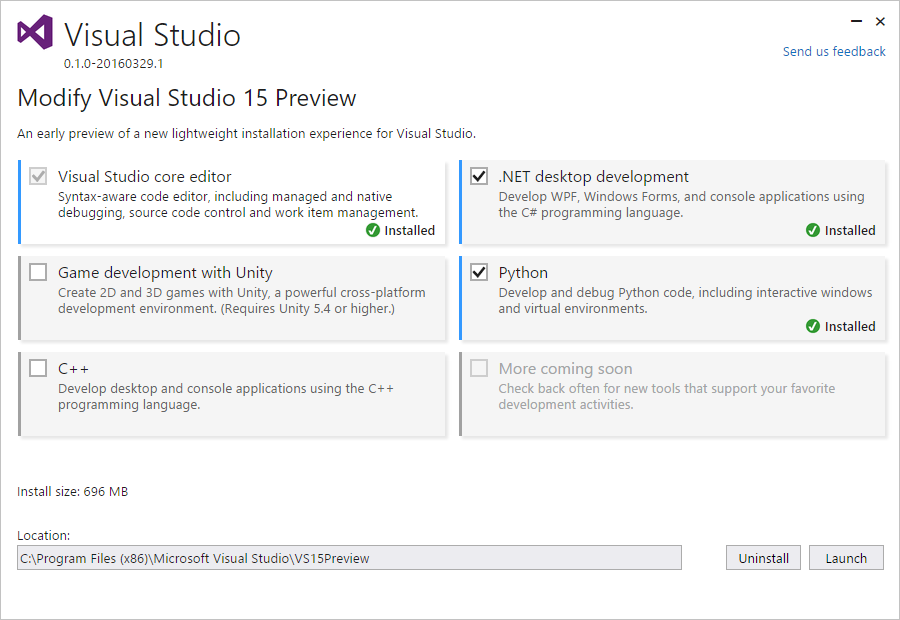
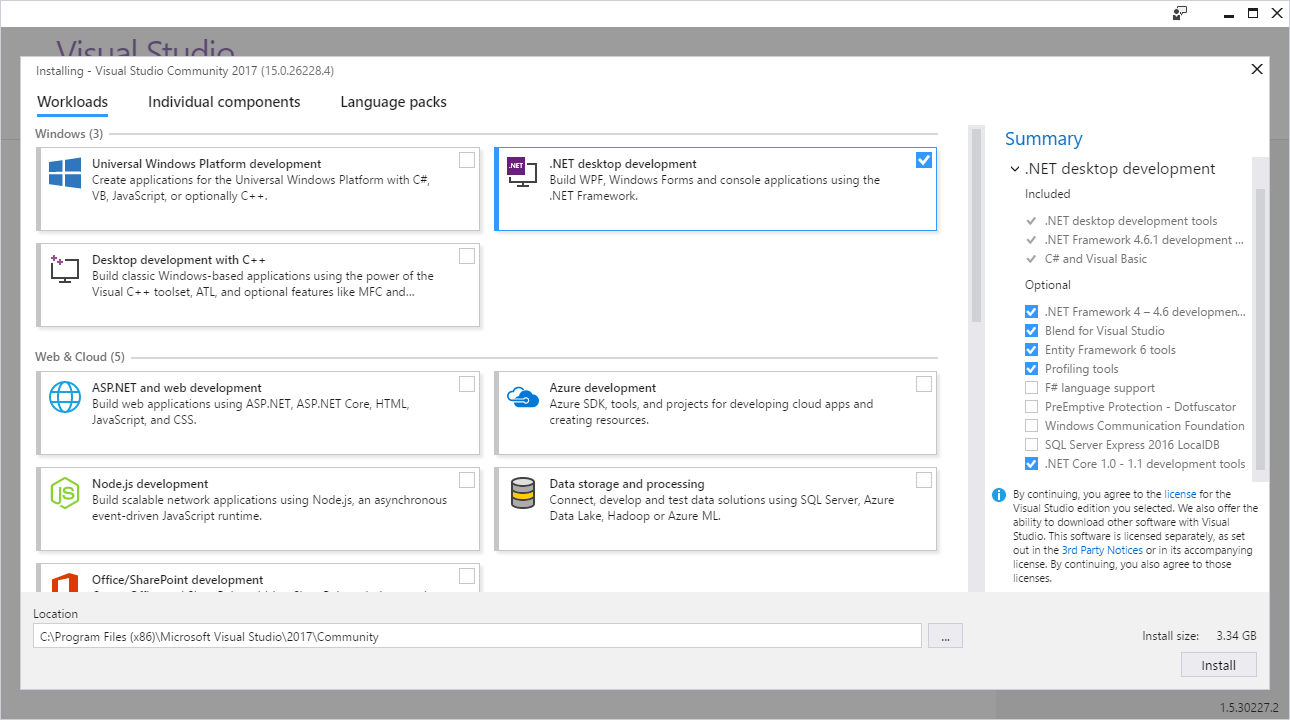
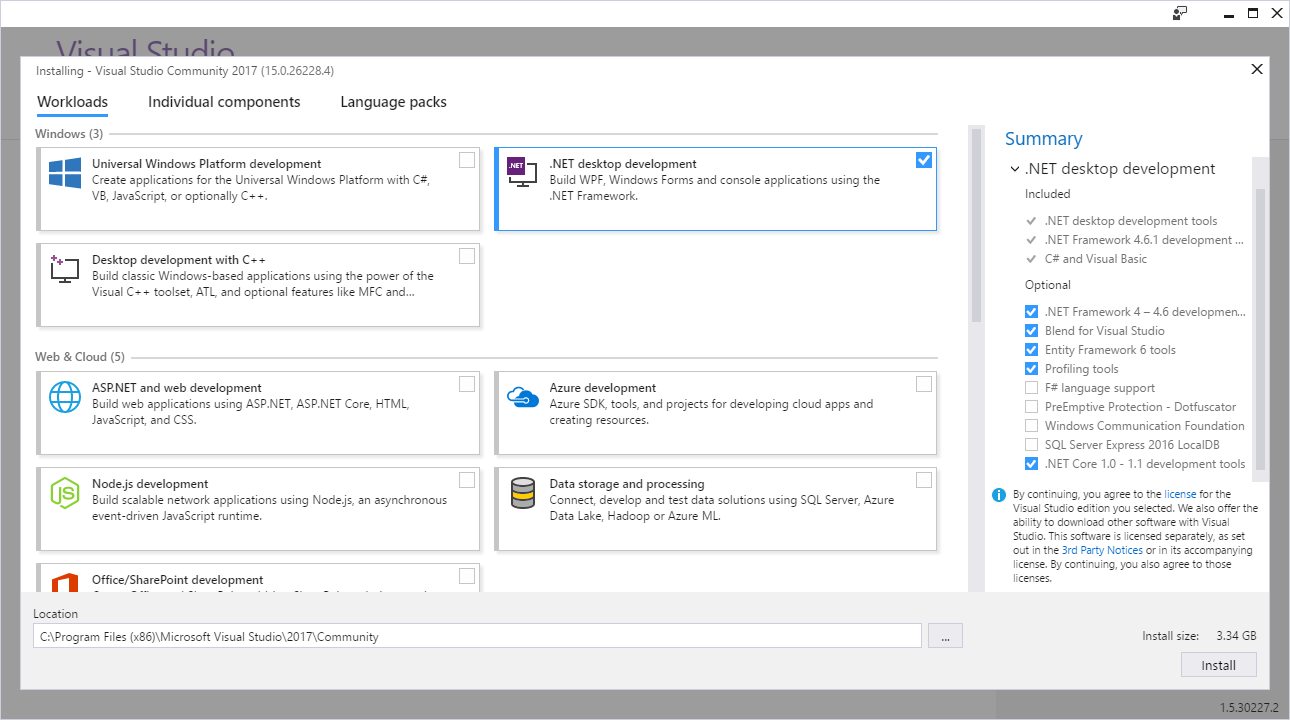
With Visual Studio 15 release getting close, a lot of new features are seeing the light of a day. One feature that doesn’t get deserved attention is the new installer shown to the world on Build 2016 conference.

It is a simple and tiny (in Visual Studio terms) installer. Executable is under 1 MB and it gets all other components from the Internet. On its own it is not a news, but some optimization magic has been happening there so your downloads are reasonably small (again, in Visual Studio terms). I am sure as release day grows closer some things might gain some “fat” but idea is there. I just hope they will still allow you to install it from media too - having Visual Studio download itself multiple times for multiple computers kinda nullifies smaller downloads.

You can give it a test run yourself and see whether it improves your workflow.