Programming in C#, Java, and god knows what not

BOM Away, in Git Style

Some time ago I made a Mercurial hook (killbom) that would remove BOM from UTF-8 encoded files. As I switched to Git, I didn’t want to part with it so it was a time for rewrite. Unlike Mercurial, there is no global hook mechanism. You will need to add hook for each repository you want it in.

Start is easy enough. Just create pre-commit file in .git/hooks directory, Looking from the base of the repository file name would thus be .git/hooks/pre-commit. Content of that file would then be as follows:

#!/bin/sh

git diff --cached --diff-filter=ACMR --name-only -z | xargs -0 -n 1 sh -c '
    for FILE; do
        file --brief "$FILE" | grep -q text
        if [ $? -eq 0 ]; then
            cp "$FILE" "$TEMP/KillBom.tmp"
            git checkout -- "$FILE"

            sed -b -i -e "1s/^\xEF\xBB\xBF//" "$FILE"
            NEEDSADD=`git diff --diff-filter=ACMR --name-only | wc -l`
            if [ $NEEDSADD -ne 0 ]; then
                sed -b -i -e "1s/^\xEF\xBB\xBF//" "$TEMP/KillBom.tmp"
                echo "Removed UTF-8 BOM from $FILE"
                git add "$FILE"
            fi

            cp "$TEMP/KillBom.tmp" "$FILE"
            rm "$TEMP/KillBom.tmp"
        else
            echo "BINARY $FILE"
        fi
    done
' sh

ANYCHANGES=`git diff --cached --name-only | wc -l`
if [ $ANYCHANGES -eq 0 ]; then
    git commit --no-verify
    exit 1
fi

What this script does is first getting list of all modified files separated by the null character so that we can deal with spaces in the file names.

git diff --cached --diff-filter=ACMR --name-only -z

For each of these files we then perform replacing of the first three bytes if they are 0xEF, 0xBB, 0xBF:

sed -b -i -e "1s/^\xEF\xBB\xBF//" "$FILE"

What follows is a bit of a mess. Since it is really hard to get information whether file has been changed without temporary files, I am abusing git to check if file has been changed since it was first staged. If that is the case, assumption will be made that it was due to sed before it. If that assumption is not correct, your commit will have one extra file. As people don’t have same file changed in both staged and un-staged are, I believe risk is reasonably low.

After all files are processed, final check is made whether anything is available for commit. If there are no files in staging area, current commit will be terminated and new commit will be started with --no-verify option. Only reason for this change is so that standard commit message can be written in cases when removal of UTF-8 BOM results in no actual files to commit. Replacing it with message “No files to commit” would work equally well.

While my goal of getting BOM removed via the hook has been reasonably successful, Git hook model is really much worse than one Mercurial has. Not only that global (local) hooks are missing but having multiple hooks one after another is not really possible. Yes, you can merge scripts together in a file but that means you’ll need to handle all exit scenarios for each hook you need. And let’s not even get into how portable these hooks are between Windows and Linux.

If you are wondering what is all that $TEMP operation, it is needed in case of interactive commits. Committing just part of file is useful but didn’t play well with this hook. Saving a copy on side sorted that problem.

Download for current version of pre-commit hook can be found at GitHub.

PS: Instead of editing pre-commit file directly, you can also create it somewhere else and create a symbolic link at proper location.

PPS: I have developed and tested this hook under Windows. It should work under Linux too, but your mileage might vary depending on exact distribution.

[2015-07-12: Added support for interactive commits.] [2015-11-17: Added detection for text/binary.]
Moving From Mercurial to Git (Part 2)

With decision to move away from Git, next big step was to transfer existing repositories. While there is a semi-reasonable Git support on Windows, any major dealing with Git is made much easier if you have Linux laying around. In my case decision was to deal with CentOS.

First step was to install all stuff we’ll need - Git, Mercurial and git-remote-hg script:

yum -y install git
yum -y install mercurial
yum -y install wget
mkdir ~/bin
wget https://raw.github.com/felipec/git-remote-hg/master/git-remote-hg -O ~/bin/git-remote-hg
chmod +x ~/bin/git-remote-hg

With that it was time to clone the first repository:

git clone hg::https://bitbucket.org/jmedved/vhdattach

In ideal world this would be all and we are close. If omitted, this step would skip reproducing branching structure on Git. But, while we are at it, I wanted to recreate branching structure I’m used to. Since conversion process leaves all branches inside remotes/origin/branches path, I wanted to move things around a bit:

cd vhdattach
git branch -a | grep 'remotes/origin/branches' | grep -v default | xargs -n 1 -I _ echo _ | cut -d/ -f 4 | xargs -n 1 -I _ git branch _ remotes/origin/branches/_
git branch

Next (optional) step was to fix my old commits:

git filter-branch --env-filter '

OLD_EMAIL="unknown"
CORRECT_NAME="Josip Medved"
CORRECT_EMAIL="jmedved@jmedved.com"

if [ "$GIT_COMMITTER_EMAIL" = "$OLD_EMAIL" ]
then
    export GIT_COMMITTER_NAME="$CORRECT_NAME"
    export GIT_COMMITTER_EMAIL="$CORRECT_EMAIL"
fi
if [ "$GIT_AUTHOR_EMAIL" = "$OLD_EMAIL" ]
then
    export GIT_AUTHOR_NAME="$CORRECT_NAME"
    export GIT_AUTHOR_EMAIL="$CORRECT_EMAIL"
fi
' --tag-name-filter cat -- --branches --tags

Since my move to Git was intended to be final I also wanted to change origin. My new home was to be GitHub:

git remote rm origin
git remote add origin git@github.com:medo64/vhdattach.git
git push --all

With that my move was complete.


Part 1

[2020-05-01: There is a bit newer version of this guide.]

Moving From Mercurial to Git (Part 1)

I used to be a huge fan of Visual Basic. When Visual Basic .NET arrived it seemed as most logical thing to use it instead of newfangled C#. However, it became clear quite quickly that Visual Basic is second-class citizen in that universe. Outside of a few exceptions, C# would get everything first. Whether it is a new feature or support for a new platform, Visual Basic would lag behind. So I switched and I haven’t looked back.

Reason why I tell this story is because I am doing similar switch again. I love Mercurial. It is a beautiful distributed versioning system which hides all complexity from a user whether it is in a command line or a great GUI client. It is modern, smart, and well designed system. Any fault with it is just nitpicking and more than outweighed by its features. All that said, Mercurial is also a second-class citizen.

Other distributed source control system almost everybody has heard of is Git. It is powerful and it has reasonable command line interface (although that wasn’t always the case). What it doesn’t have is proper GUI support nor it is equally well designed as Mercurial - especially when it comes to multiplatform support. Git is a bunch of different tools and it shows (you can make a hobby out of finding different commands that do exactly the same thing). However, fact is that you can get used to its shortcomings.

Community gathering around Git is much bigger than anything Mercurial can offer. Small part of it is due to its undeniable power. But I believe big part is due to being Linus’ baby. That gave it an early boost and, once you get used to its peculiarities, there is simply no reason to go to the other versioning system. And more people brings even more people in. And gets more people working on development. So peculiarities became bugs and get fixed. And platform liveliness brings even more people and better. Positive reinforcement at its best.

Simple search for Git vs Mercurial hosting or Git vs Mercurial push best illustrates the difference in usage. Git has simply won. Mind you, that doesn’t mean that Mercurial is going to die - I surely hope not. But it is going to be always an alternative choice.

All that said, I will be moving my open source project to GitHub. Private projects I don’t intend to share will stay with BitBucket but I will be switching them to Git as I do updates. Only things staying on Mercurial will be projects I am sharing with others and those I don’t update at all.

And time with Mercurial wasn’t really wasted - far from it. I would go as far to tell that it is the best distributed version control for taking the first steps. Pretty much all things I’ve learned can transfer directly to Git.

So long and thanks for all the fish.


Part 2

Easiest Black Bitmap

For one program of mine I had a lot of dynamic resource fetching to do. Unfortunately, sometimes a lookup in resources would return null bitmap. Whether that was due to the missing resource or because of a wrong key is of less importance. I didn’t want system to crash but I did want for program to crash just because bitmap was missing. But I did want to have that clearly visible so that I could catch it.

One idea was to use dummy resource, e.g.:

item.Image = (bitmap != null) ? bitmap : dummyBitmap;

However, I didn’t like that solution due to a potential resource release at other places. Nothing worse then releasing resource in use somewhere else. And I was more in the mood for one-liner - resources be damned.

But how to create an bitmap and color it at the same time (by default, bitmap is transparent)? Well, we could always create one without alpha channel, e.g.:

item.Image = (bitmap != null) ? bitmap : new Bitmap(size, size, PixelFormat.Format8bppIndexed);

This will make your bitmap one big black rectangle. It might not be ideal but it is definitely noticeable.

PS: Since I wanted this only during debugging, my final code ended up being just a smidge more complicated:

#if DEBUG
    item.Image = (bitmap != null) ? bitmap : new Bitmap(size, size, PixelFormat.Format8bppIndexed);
#else
    if (bitmap != null) { item.Image = bitmap; }
#endif

Using C# to Remove ReFS Integrity Stream

Illustration

As I moved my data drive to ReFS, I was faced with a problem of removing integrity stream for virtual disks. For performance reasons Microsoft doesn’t work with ReFS integrity streams and thus I had to disable it for all VHD files I had.

Since I use my own VHD Attach to attach disks, I also wanted to integrate removal of integrity stream upon opening the disk. And that meant C# solution was strongly preferred. As functionality is rather new, Windows API was the only way.

First course of action is, of course, to open the file. Only important thing is to have have both read and write access:

var handle = NativeMethods.CreateFile(
    fileName,
    NativeMethods.GENERIC_READ | NativeMethods.GENERIC_WRITE,
    FileShare.None,
    IntPtr.Zero,
    FileMode.Open,
    0,
    IntPtr.Zero);

Once we have a handle, we can can use DeviceIoControl to set checksum type to none.

var newInfo = new NativeMethods.FSCTL_SET_INTEGRITY_INFORMATION_BUFFER() {
    ChecksumAlgorithm = NativeMethods.CHECKSUM_TYPE_NONE
};
var newInfoSizeReturn = 0;

NativeMethods.DeviceIoControl(
    handle,
    NativeMethods.FSCTL_SET_INTEGRITY_INFORMATION,
    ref newInfo,
    Marshal.SizeOf(newInfo),
    IntPtr.Zero,
    0,
    out newInfoSizeReturn,
    IntPtr.Zero
);

Those two simple commands are all that takes. Sample (with actual API definitions) is available for download.

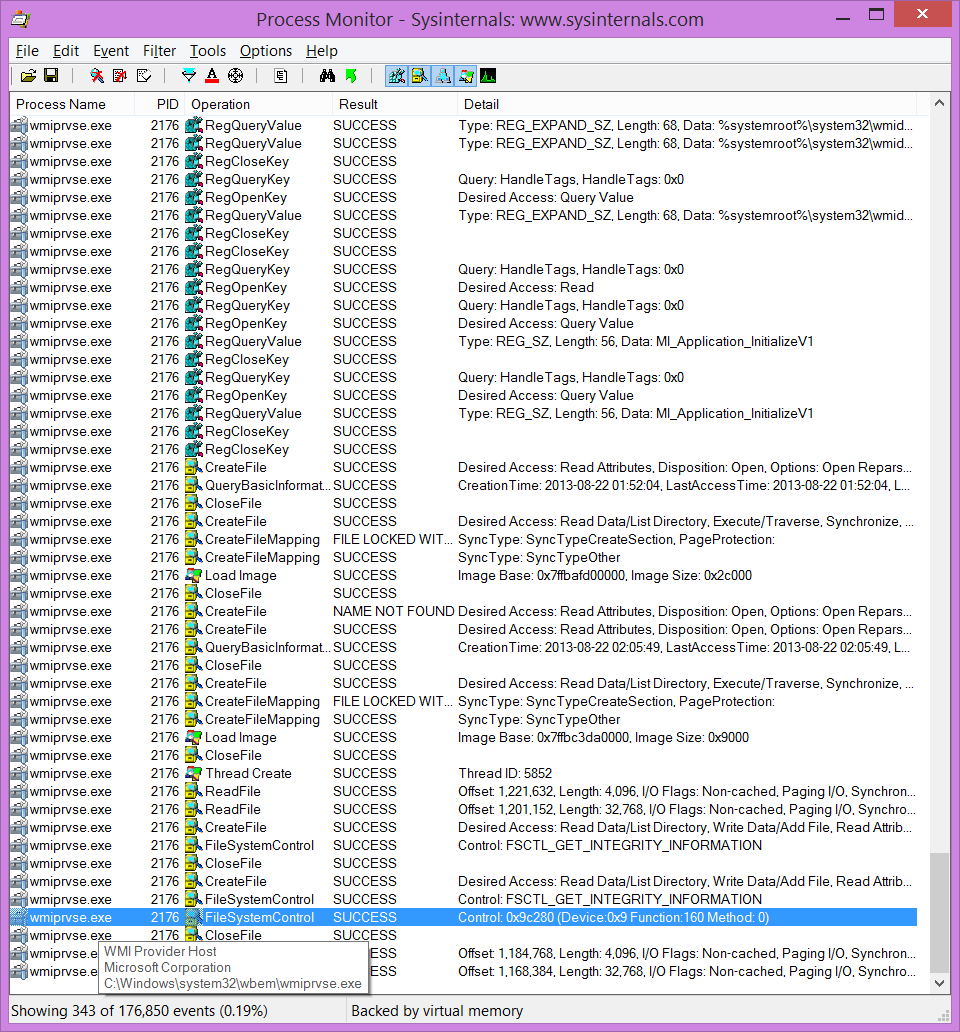
And rant for the end - it was annoyingly hard to find resources for this. Yes, some resources do exist (albeit without examples) but to find them you need to know what you are searching for. Since I knew Set-FileIntegrity PowerShell cmdlet does it somehow, I used Process Monitor tool to capture what exactly was happening. There I got a hint toward DeviceIoControl function and things got a bit easier. To keep it a bit interesting, documentation also lies that “The integrity status can only be changed for empty files.” Only confidence in Process Monitor’s capture kept me going in that direction.

Maybe it is me getting older but I have a feeling Windows API documentation is getting worse and worse. I hated Windows 7 documentation for virtual disk support and I thought that was the lowest quality Microsoft can do. But not much seems improved with newer versions. Gone are the times when new feature would get an example or two and more than a blog post as a design document.

I believe ReFS should deserve more.

One Time Passwords in C#

Illustration

Recently I was working on a project where time-based one-time password algorithm might come in handy. You know the one - you have token that displays 6-digit number and you enter it after your user name and password. It used to be restricted to hardware (e.g. RSA) but these days Google Authenticator is probably the best known.

While rolling something on your own is always possibility, following the standard is always better because all tough questions have been answered by people smarter than you. In this case all things needed were covered in RFC 6238 (Time-Based One-Time Password Algorithm) and RFC 4226 (An HMAC-Based One-Time Password Algorithm).

While specifications do grant you some freedom in algorithm choice and number of digits you wish to generate, looking at other services implementing the same algorithm, 6-digit SHA-1 based code seems to be unwritten rule. Also universal seems the rule to use (unpadded) Base32 encoding of a secret key. Any implementation of one-time password algorithm has obey these rules if it wants to use existing infrastructure - both server side services and end-user applications (e.g. Google Authenticator or Pebble one).

With my OneTimePassword implementation, basic code generation would looks something like this:

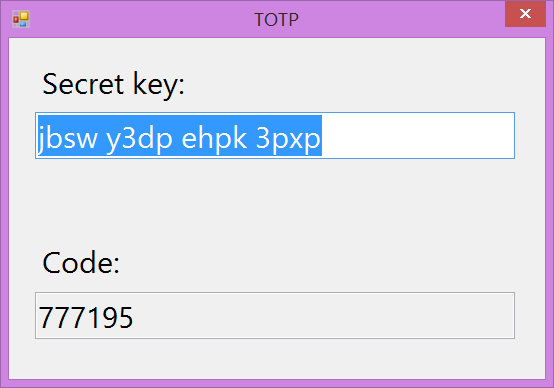
var otp = new OneTimePassword("jbsw y3dp ehpk 3pxp");
txtCode.Text = otp.GetCode().ToString("000000"); //to generate new code

If you are on server side, verification would look just slightly different:

var otp = new OneTimePassword("jbsw y3dp ehpk 3pxp");
var isValid = otp.IsCodeValid(code); //to verify one that user entered

If you want to generate a new secret key for end-user:

var otp = new OneTimePassword();
var secret = otp.GetBase32Secret();

Pretty much all basic scenarios are covered and then some. Sample with full code is available for download.

PS: OneTimePassword class supports many more things than ones mentioned here. You can use it in HOTP (counter) mode with TimeStep=0; you can generate your own keys; validate codes; use SHA-256 and SHA-512; other digit lengths… Play with it and see.

Determining IPv4 Broadcast Address in C#

When dealing with IPv4 network, one thing that everybody needs sooner or later is a broadcast address based on IP address and its netmask.

Let’s take well known address/netmask combo as an example - 192.168.1.1/255.255.255.0. In binary this would be:

Address .: **^^11000000 10101000 00000001^^ 00000001**
Mask ....: **11111111 11111111 11111111 00000000**
Broadcast: **^^11000000 10101000 00000001^^ !!11111111!!**

To get its broadcast address, we simply copy all address bits where netmask is set. All remaining bits are set and our broadcast address 192.168.1.255 is found.

A bit more complicated example would be address 10.33.44.22 with a netmask 255.255.255.252:

Address .: **^^00001010 00100001 00101100 000101^^10**
Mask ....: **11111111 11111111 11111111 11111100**
Broadcast: **^^00001010 00100001 00101100 000101^^!!11!!**

But principle is the same, for broadcast address we copy all address bits where mask is 1. Whatever remains gets a value of 1. In this case this results in 10.33.44.23.

As you can see above, everything we need is simply taking an original address and performing OR operation between it and a negative netmask: broadcast = address | ~mask. In C# these steps are easiest to achieve if we convert everything to integers first:

var addressInt = BitConverter.ToInt32(address.GetAddressBytes(), 0);
var maskInt = BitConverter.ToInt32(mask.GetAddressBytes(), 0);
var broadcastInt = addressInt | ~maskInt;
var broadcast = new IPAddress(BitConverter.GetBytes(broadcastInt));

Full example is available for download.

Windows Store App Doesn't Start on Virtual Drive

Illustration

As I went to update my Resistance Windows Store application, I stumbled upon unexpected error while trying to run it. Message was quite generic “This application could not be started. Do you want to view information about this issue?” and application would stay stuck on the startup screen.

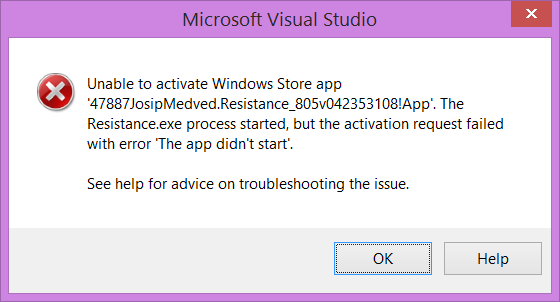
Details were not much better. It was essentially the same error message: “Unable to activate Windows Store app ‘47887JosipMedved.Resistance_805v042353108!App’. The Resistance.exe process started, but the activation request failed with error ‘The app didn’t start’.” As error messages go, pretty much useless.

I was thinking that I broke something with changes so I reverted to my last known good configuration - one that is actually currently deployed in the Store. Still the same error.

It took me a while to notice that, once project is copied to the other drive, everything would work properly. A bit of back and forth and I believe I found the issue.

I keep all my projects stored on a virtual disk. While everything else treats that disk as a real physical thing, Visual Studio sees the difference but only when dealing with Windows Store applications. It just wouldn’t work.

As you can guess it, solution was to copy project on a physical drive and work from there. Easy as solutions go but definitely leaves the bitter taste. Lot of wasted time simply because of a lousily written error message. A bit more clarity next time?

Beware of Magic in AES CBC

In case of encrypted text I commonly see “magic” footer being used as a sole verification method for AES CBC; i.e. assumption is that, if last bytes were decrypted correctly, all previously decrypted bytes are valid too. However, that assumption can fail horribly.

Once case when it fails is when configurable IV is used. You can have nonsense for a IV vector and decryption will succeed. Even worse, while first few bytes will be invalid, 8-byte blocks following it will look just fine. If you validate content only by last few bytes, your program might happily continue to work without any issue.

But lets assume you have static IV and that this issue doesn’t affect you. And you are worried only about stream errors anyhow. Well, I hate to inform you but CBC mode is self-synchronizing, i.e. any recoverable errors in one block will go away after certain number of blocks. For example, if you have an error in first byte of a stream, next fifteen bytes will be corrupted but rest of stream (including your footer) will look just fine.

Corruption in the middle of stream will cause exception most of the time, but not always. If it passes unnoticed you can have valid header, valid footer and garbage in between.

As you can see from the two examples above, you cannot rely purely on fact that some stream bytes were decrypted as a proof that some other part of stream is not corrupted. Only way to be sure about stream validity is to use hash/CRC functions that were actually designed to detect corruption.

Example of both these behaviors is available for download. Below is example output with both valid and invalid decryption having a same footer (FF-FF-FF-FF):

Decrypted (OK) ..........: 00-01-02-03-04-05-06-07-08-09-0A-0B-0C-0D-0E-0F-10-11-12-13-FF-FF-FF-FF
Decrypted (invalid IV) ..: FF-01-02-03-04-05-06-07-08-09-0A-0B-0C-0D-0E-0F-10-11-12-13-FF-FF-FF-FF
Decrypted (invalid input): 31-33-7C-D9-A9-91-47-DD-52-3A-64-08-FD-2F-D4-C8-1D-11-12-13-FF-FF-FF-FF

Visual Studio Community 2013

Illustration

A bit over a week ago a new Visual Studio edition has appeared pretty much out of blue. For all practical purposes you can look at it as a cross between Visual Studio Professional (has same features) and Express editions (it’s free).

Unlike Express editions, Community can only be used by an individual developer, for open source, for learning/teaching, and in a small non-enterprise settings. If you are working for enterprise company, you’re out of luck.

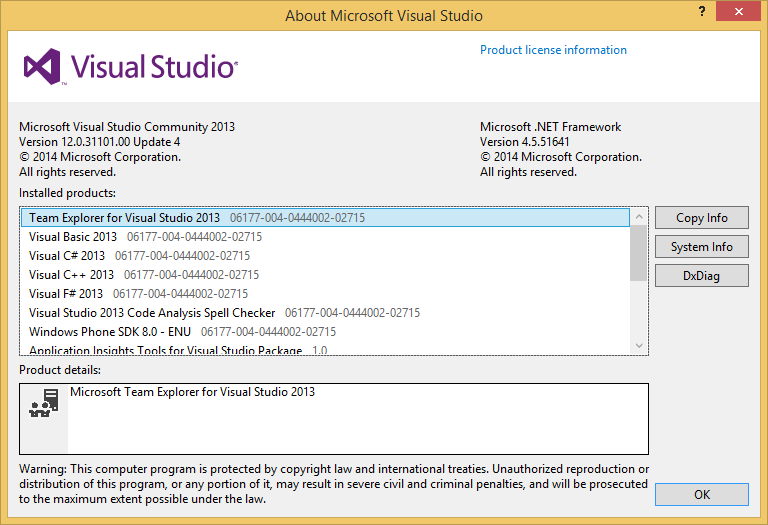
Since Community is essentially the same as a Professional edition, there is not much new things that can be said about it. It can slice, it can dice, and it is an almost perfect development environment. Yes, there are Premium and Ultimate and they do offer some advantages (e.g. IntelliTrace is a gem) but most of the time one can live without those features just fine. Unlike with the Express editions you won’t feel constrained with the Community.

Surprisingly you cannot really install Community edition side-by-side with any other paid Visual Studio. Official explanation is that this is because Community is the part of a same line as other editions but I still find it an unfortunate decision. Developers wearing two hats in BYOD scenarios (e.g. enterprise by day, open source by night) might get into some conflicting situations. Side-by-side with the Express editions will still be supported so not all is black.

Speaking of Express editions, it is not really clear to me what is their destiny. Currently they do stand together with Community but they do overlap quite a bit. If we learned anything from the past, their days are numbered. I would like to be wrong since I do love them. Even with all their shortcomings, I can still see them useful in multiple scenarios (mostly due to their quite permissive licence). I will miss them.

If you currently don’t have anything better than Express on your machine and you fit into the restrictions, it is definitely worth checking out.